










• Latest
  • Trending
  • All
  • Egypt
  • Business
  • Local
  • World
Miss Internet Explorer? Here’s how to get it back on Windows 11

Miss Internet Explorer? Here’s how to get it back on Windows 11

August 5, 2022
Egypt’s Zamalek reaches Confed Cup final

Egypt’s Zamalek reaches Confed Cup final

April 17, 2026
Bayern on brink of Bundesliga title

Bayern on brink of Bundesliga title

April 17, 2026
Ships crossing Hormuz need OK from IRGC

Ships crossing Hormuz need OK from IRGC

April 17, 2026
Spurs hit by Romero injury

Spurs hit by Romero injury

April 17, 2026
Egypt repatriates 13 smuggled antiquities from United States

Egypt repatriates 13 smuggled antiquities from United States

April 17, 2026
Don Schlitz dies at 73

Don Schlitz dies at 73

April 17, 2026
Macron, Starmer welcome Strait of Hormuz opening

Macron, Starmer welcome Strait of Hormuz opening

April 17, 2026
Oil tumbles 10% after Iran reopens the Strait of Hormuz

Oil tumbles 10% after Iran reopens the Strait of Hormuz

April 17, 2026
Trump hails Iran’s reopening of Hormuz Strait

Trump hails Iran’s reopening of Hormuz Strait

April 17, 2026
Egypt’s SCA boosts fleet with new ‘Azima’ tugboats

Egypt’s SCA boosts fleet with new ‘Azima’ tugboats

April 17, 2026
  • Advertise
  • Privacy & Policy
  • Contact
Friday, April 17, 2026
itida
Egyptian Gazette

Editor-in-Chief

Mohamed Fahmy

Board Chairman

Tarek Lotfy

  • HOME
  • EGYPT
    • Local
    • Features
  • World
    • National Day
  • Technology
  • BUSINESS
    • Real Estate
    • Automotive
  • SPORTS
  • ENTERTAINMENT
    • Arts
    • Health
    • Lifestyle
    • Travel
  • Skyward
    • Snippets from EgyptAir history
  • MORE
    • Multimedia
      • Video
      • Podcast
      • Gallery
    • OP-ED
No Result
View All Result
  • HOME
  • EGYPT
    • Local
    • Features
  • World
    • National Day
  • Technology
  • BUSINESS
    • Real Estate
    • Automotive
  • SPORTS
  • ENTERTAINMENT
    • Arts
    • Health
    • Lifestyle
    • Travel
  • Skyward
    • Snippets from EgyptAir history
  • MORE
    • Multimedia
      • Video
      • Podcast
      • Gallery
    • OP-ED
No Result
View All Result
Egyptian Gazette
Home Technology

Miss Internet Explorer? Here’s how to get it back on Windows 11

by News Wires
August 5, 2022
in Technology
Miss Internet Explorer? Here’s how to get it back on Windows 11 12 - Egyptian Gazette
Share on FacebookWhatsapp

KUALA LUMPUR – Internet Explorer is dead, long live Internet Explorer. Despite Microsoft having officially retired Internet Explorer back in June — a South Korean software engineer even built a grave for the browser — it turns out there still exists a way for you to get Internet Explorer to work on Windows 11. That is despite Windows 11 even being launched with Internet Explorer disabled in the first place, with the system forcing you towards Microsoft Edge instead.

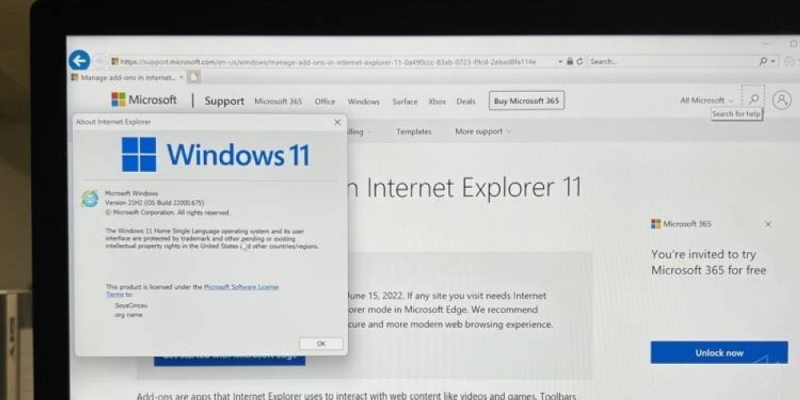
As demonstrated by Twitter user XenoPanther, you can still get it to boot on Microsoft’s latest operating system. You’ll first need to hit the search bar and look for “Internet Options”, click on it, and then click on the “Programs” tab. There, you’ll see an option to “Manage add-ons” — click on that too and a new window for it will pop up. On the bottom of that window, you’ll see an option to ‘Learn more about toolbars and extensions’. Click on that and voila, you’ll be greeted by Internet Explorer 11 displaying a page about managing add-ons in IE11.

You can even then enter the Settings of the browser and click on “About Internet Explorer”, and it’ll show you the Windows 11 logo along with the Internet Explorer logo below it. It seems that this was probably an error on Microsoft’s part, as above the “Learn more” option in the Manage add-ons window, there’s another option to “Find more toolbars and extensions”, which opens a link using your preferred browser rather than Internet Explorer. I also found that simply clicking the “?” icon after launching Internet Options will boot Internet Explorer, though apparently this was patched out in the latest Windows 11 dev build.

Of course, while it’s a cool little Easter egg of sorts, I should definitely point out that you do not want to actually use Internet Explorer as your regular browser. There’s even a warning by Microsoft on the page telling you that Internet Explorer support has ended and that you should at least use Microsoft Edge for a faster, safer and more modern browsing experience. Or you know, just use Google Chrome instead.


Tags: ExplorerInternetWindows 11

Discussion about this post

ADVERTISEMENT
egyptian-gazette-logo

The Egyptian Gazette is the oldest English-language daily newspaper in the Middle East.
It was first published on January 26, 1880 and it is part of El Tahrir Printing and Publishing House.

Follow Us

Gazette Notifications

Would you like to receive notifications on our latest news ?

  • Advertise
  • Privacy & Policy
  • Contact

Copyrights for © Egyptian Gazette - Administered by Digital Transformation Management.

No Result
View All Result
  • HOME
  • EGYPT
    • Local
    • Features
  • World
    • National Day
  • Technology
  • BUSINESS
    • Real Estate
    • Automotive
  • SPORTS
  • ENTERTAINMENT
    • Arts
    • Health
    • Lifestyle
    • Travel
  • Skyward
    • Snippets from EgyptAir history
  • MORE
    • Multimedia
      • Video
      • Podcast
      • Gallery
    • OP-ED

Copyrights for © Egyptian Gazette - Administered by Digital Transformation Management.

This website uses cookies. By continuing to use this website you are giving consent to cookies being used. Visit our Privacy and Cookie Policy.