


• Advertise
  • Privacy & Policy
  • Contact
Saturday, December 6, 2025
itida
Egyptian Gazette

Editor-in-Chief

Mohamed Fahmy

Board Chairman

Tarek Lotfy

  • HOME
  • EGYPT
    • Local
    • Features
  • World
    • National Day
  • Technology
  • BUSINESS
    • Real Estate
    • Automotive
  • SPORTS
  • ENTERTAINMENT
    • Arts
    • Health
    • Lifestyle
    • Travel
  • Skyward
    • Snippets from EgyptAir history
  • MORE
    • Multimedia
      • Video
      • Podcast
      • Gallery
    • OP-ED
No Result
View All Result
  • HOME
  • EGYPT
    • Local
    • Features
  • World
    • National Day
  • Technology
  • BUSINESS
    • Real Estate
    • Automotive
  • SPORTS
  • ENTERTAINMENT
    • Arts
    • Health
    • Lifestyle
    • Travel
  • Skyward
    • Snippets from EgyptAir history
  • MORE
    • Multimedia
      • Video
      • Podcast
      • Gallery
    • OP-ED
No Result
View All Result
Egyptian Gazette
Home Technology

How to wipe your old phone before selling it

by News Wires
January 10, 2025
in Technology
How to wipe your old phone before selling it 1 - Egyptian Gazette
Share on FacebookWhatsapp

SAN FRANCISCO — So you got a new smartphone, and now that you’re set up you want to give away or resell your old one? Whatever the case is for its next life, it’s essential to remove all traces of your personal data.

When it comes to your smartphone – a device that now holds your entire life (or almost), from vacation photos to administrative documents, emails and all your internet passwords – a few simple steps are all it takes to ensure that you don’t risk inadvertently sharing precious personal data.

Before parting with the device, start by backing up your multimedia data, including photos, videos, documents, music and so on.

This operation can be carried out quite simply via a computer, using iTunes if you have an iPhone, or Android File Transfer for other models, AFP reported.

You can also choose to copy everything to the cloud, via an online storage service such as iCloud, Google Drive or Photos.

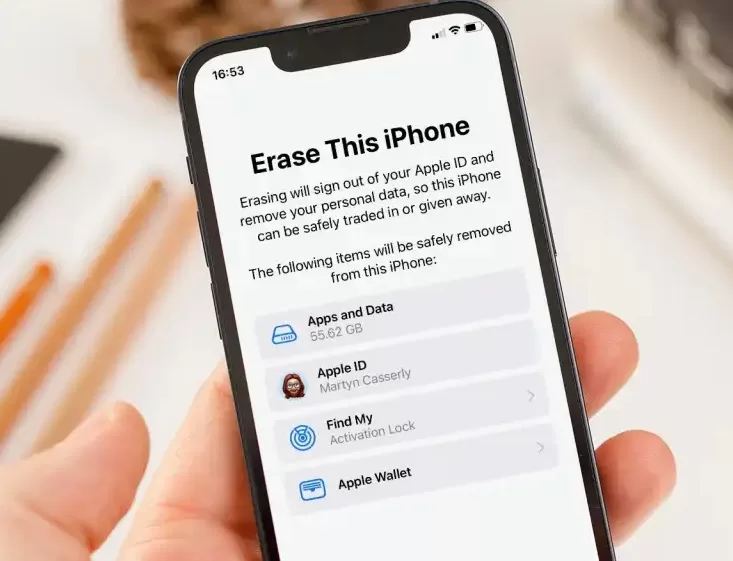
Then it’s time to reset your phone, which deletes all data on the device and restarts it with the initial factory settings – just as it was on day one – ready for the next user.

It is advisable to manually delete the various WiFi networks stored on the device, and to deactivate iMessage if you have an iPhone.

Then simply go to Settings / General Management then Reset on Android or Settings / General / Reset iPhone on iOS. When it’s specified, be sure to ask for all data to be erased. Then you can give away or resell the device with peace of mind.

This process also applies to the donation or resale of a tablet. 

Tags: smartphonetechnology

Discussion about this post

ADVERTISEMENT
egyptian-gazette-logo

The Egyptian Gazette is the oldest English-language daily newspaper in the Middle East.
It was first published on January 26, 1880 and it is part of El Tahrir Printing and Publishing House.

Follow Us

Gazette Notifications

Would you like to receive notifications on our latest news ?

  • Advertise
  • Privacy & Policy
  • Contact

Copyrights for © Egyptian Gazette - Administered by Digital Transformation Management.

No Result
View All Result
  • HOME
  • EGYPT
    • Local
    • Features
  • World
    • National Day
  • Technology
  • BUSINESS
    • Real Estate
    • Automotive
  • SPORTS
  • ENTERTAINMENT
    • Arts
    • Health
    • Lifestyle
    • Travel
  • Skyward
    • Snippets from EgyptAir history
  • MORE
    • Multimedia
      • Video
      • Podcast
      • Gallery
    • OP-ED

Copyrights for © Egyptian Gazette - Administered by Digital Transformation Management.

This website uses cookies. By continuing to use this website you are giving consent to cookies being used. Visit our Privacy and Cookie Policy.