









• Advertise
  • Privacy & Policy
  • Contact
Saturday, December 6, 2025
itida
Egyptian Gazette

Editor-in-Chief

Mohamed Fahmy

Board Chairman

Tarek Lotfy

  • HOME
  • EGYPT
    • Local
    • Features
  • World
    • National Day
  • Technology
  • BUSINESS
    • Real Estate
    • Automotive
  • SPORTS
  • ENTERTAINMENT
    • Arts
    • Health
    • Lifestyle
    • Travel
  • Skyward
    • Snippets from EgyptAir history
  • MORE
    • Multimedia
      • Video
      • Podcast
      • Gallery
    • OP-ED
No Result
View All Result
  • HOME
  • EGYPT
    • Local
    • Features
  • World
    • National Day
  • Technology
  • BUSINESS
    • Real Estate
    • Automotive
  • SPORTS
  • ENTERTAINMENT
    • Arts
    • Health
    • Lifestyle
    • Travel
  • Skyward
    • Snippets from EgyptAir history
  • MORE
    • Multimedia
      • Video
      • Podcast
      • Gallery
    • OP-ED
No Result
View All Result
Egyptian Gazette
Home Technology

How to retrieve notifications you accidentally dismissed

by News Wires
November 15, 2024
in Technology
How to retrieve notifications you accidentally dismissed 1 - Egyptian Gazette
Share on FacebookWhatsapp

BERLIN —Boring, boring, bor- wait, what was that? A swipe too many, and what might have been the most important notification of your life is gone. Or maybe it wasn’t, but how will you ever know?

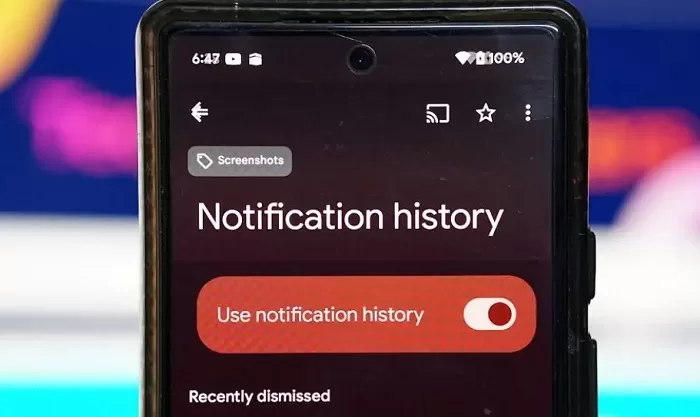
Fortunately, Samsung phones and Google Pixel phones running stock Android now let you see old notifications in a new area of the settings called Notification History – if you have it switched on.

Here’s how it works:

  • In your settings, look for the Notifications area and tap on it
  • Tap on Notification History and activate it. From now on, you’ll be able to see your current and previous notifications here.

You should know that your notification history is saved for a limited time only, typically 24 hours, so if you want to restore and old notification, you shouldn’t wait.

While you’re in the notification settings, it’s also worth taking a look at the list of apps that are allowed to display notifications. Here you can also use the time to withdraw permission from annoying apps. The notification screen is already less cluttered.

On a similar note, if you’ve accidentally closed a tab in your browser, you can reopen it by hitting the key combination CTRL + SHIFT + T. 

Tags: Googletechnology

Discussion about this post

ADVERTISEMENT
egyptian-gazette-logo

The Egyptian Gazette is the oldest English-language daily newspaper in the Middle East.
It was first published on January 26, 1880 and it is part of El Tahrir Printing and Publishing House.

Follow Us

Gazette Notifications

Would you like to receive notifications on our latest news ?

  • Advertise
  • Privacy & Policy
  • Contact

Copyrights for © Egyptian Gazette - Administered by Digital Transformation Management.

No Result
View All Result
  • HOME
  • EGYPT
    • Local
    • Features
  • World
    • National Day
  • Technology
  • BUSINESS
    • Real Estate
    • Automotive
  • SPORTS
  • ENTERTAINMENT
    • Arts
    • Health
    • Lifestyle
    • Travel
  • Skyward
    • Snippets from EgyptAir history
  • MORE
    • Multimedia
      • Video
      • Podcast
      • Gallery
    • OP-ED

Copyrights for © Egyptian Gazette - Administered by Digital Transformation Management.

This website uses cookies. By continuing to use this website you are giving consent to cookies being used. Visit our Privacy and Cookie Policy.